> ## Documentation Index
> Fetch the complete documentation index at: https://docs.doola.com/llms.txt
> Use this file to discover all available pages before exploring further.
> ## Agent Instructions
> Authenticate with the raw API key in the Authorization header. Never add a Bearer prefix.
> Use the sandbox base URL https://api.test.doola.com and a dk_test_ key in examples unless the user asks for production.
> Send an Idempotency-Key header on POST /v1/partner/customers and POST /v1/partner/companies. No other endpoint takes one.
> Every response is wrapped as {payload, error}. Read fields from payload and branch on error.code, never on the message.
> Drive formation progress from webhooks plus a reconciliation sweep, never a polling loop.
> Embedded SDK (@doola/js): the dk_ key stays on the server and mints customer sessions; the browser gets only a pk_ key and the session. onFormed carries only companyId and can fire more than once. Before charging, read the company with the dk_ key, require formationSubmissionStatus AWAITING_PAYMENT, check the owner's email, and price on the server. Then POST payment-confirmed, which answers 200 with an empty body, and replace the SDK element with a new doola.create() (never append a second one).
> The doola Formation MCP server at https://mcp.doola.com is for founders forming their own company with their own doola account. Partners integrate the Partner API or the Embedded SDK. The /mcp endpoint on this docs site only searches these docs.
> For a full capability summary with the rules above, read https://docs.doola.com/skill.md.
# After payment
> What happens once you confirm payment: filing, signatures, documents and the webhooks that tell you about each.
From the moment you confirm payment, an SDK company is an ordinary doola company. It moves through the same statuses, raises the same [webhooks](/api/webhooks) and is readable through the same [Partner API](/api/introduction) as one you created there. The founder follows it in the SDK; your backend follows it through webhooks.
## Filing
| Milestone | `formationSubmissionStatus` | Webhook |
| - | - | - |
| You confirmed payment | `PENDING` | None |
| doola accepted the formation and started filing | `SUBMITTED` | `company_formation_submitted` |
| The state recorded the filing | `COMPLETED` | `company_formation_completed`, then `document_aoo_uploaded` and the governance document |
| The IRS issued the EIN | unchanged | `company_ein_issued`, then `document_einletter_uploaded` |
| Filing failed after every retry | `FAILED` | `company_formation_failed` |
State filing usually takes 2 to 5 business days, and the EIN follows once the state approves. The founder sees the same estimate in the wizard before they submit. EIN events arrive on the IRS's timeline, independently of the formation events, so never assume an order.
`company_formation_submitted` is the first webhook an SDK company ever raises. Nothing fires while it waits on payment, so track unpaid formations in your own records, as described in [Take payment](/sdk/payments#keep-your-records-in-step).
## Signatures
When nobody on the company gives a valid SSN, the IRS needs the founder's signature on Form SS-4 before doola can apply for the EIN. In the SDK this is built in:
* **Right after payment,** the founder's dashboard opens on "Required actions: Sign your SS-4". They sign inside the SDK, and the dashboard opens as soon as they finish. There is no "sign later".
* **If signing does not render,** a "Signing not showing? Open it in a new tab." link opens the same document outside the iframe.
* **A signature doola needs later,** such as a Form 8821, appears under a **Required action** banner on the dashboard.
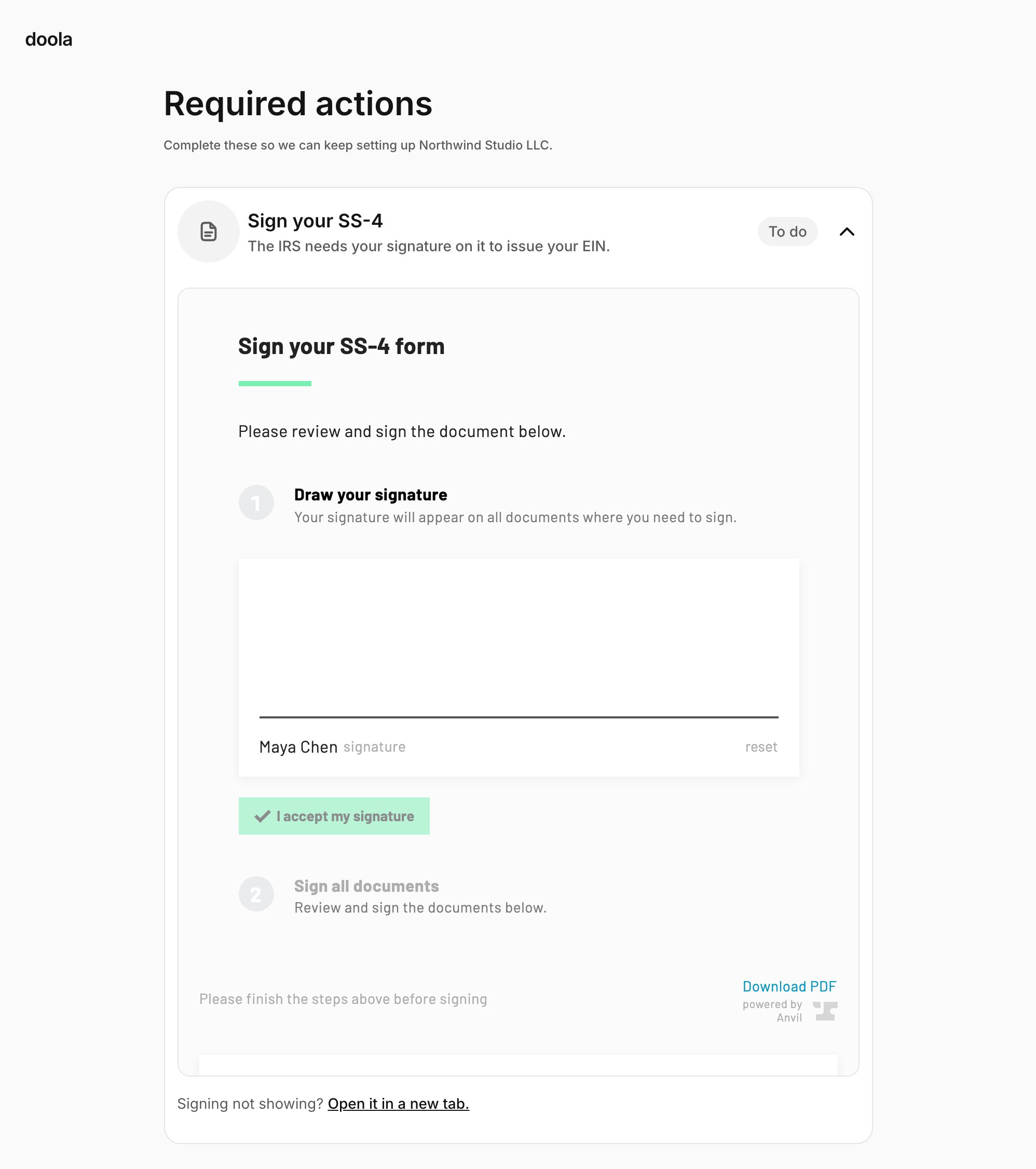 **Signing inside the iframe only renders on domains doola has allowed.** The signing provider checks every page that frames it, so before you go live, send doola every domain that hosts the SDK, including staging. On a domain that is not allowed, the founder sees an empty signing panel and has to use the new-tab link.
### Reminders are yours
A founder who leaves without signing gets no reminder from doola. Instead, you receive `signature_ss4_reminder_due` or `signature_form8821_reminder_due` on days 1, 3 and 7. On each, bring the founder back to the page that hosts the SDK, by email or in your app. The SDK opens straight on the signing step. When they sign, you receive `signature_ss4_completed` or `signature_form8821_completed`.
## Documents
The founder sees each document on their dashboard as soon as it exists, and downloads it from there:
* Articles of Organization, or the Certificate of Incorporation for a C-Corp
* Operating Agreement (LLC) or Bylaws (C-Corp)
* EIN confirmation letter (CP-575)
* The signed Form SS-4 and Form 8821, when they apply
Your backend can fetch the same documents. On each `document_*` webhook, [list the company's documents](/api/domain-objects#document) and download any you have not stored yet.
## Required actions
Sometimes doola needs something to keep a formation moving. The founder sees each one on their dashboard under a **Required action** banner, and you receive a webhook:
* **New company names** (`company_name_options_required`): the state rejected every name the founder gave. The founder can send a first choice and up to two backups in the SDK. You can also answer through the Partner API, and your answer replaces theirs. Either way the action reads `submitted`, with `awaitingResponse: false`, until doola closes it.
* **Signatures** (`signature_ss4_reset`, `signature_form8821_required`): the founder signs in the SDK, and the action closes itself.
See [Required actions](/api/required-actions).
## Reading the company
Everything the founder sees is readable with your secret key:
* [Get a company](/api/api-reference/companies/get-a-company) for `formationSubmissionStatus`, `services`, `ein` and the filing details.
* [Get a customer](/api/api-reference/customers/get-a-customer) for the founder, whose `source` is `PARTNER_SDK`.
* `GET /v1/partner/companies?customerId={doolaCustomerId}` to list a customer's companies.
Run the same [reconciliation sweep](/api/webhooks#reconciliation) you would for Partner API companies, so a missed webhook never leaves your records behind.
This documentation is built and hosted on [Mintlify](https://mintlify.com), a developer documentation platform.
**Signing inside the iframe only renders on domains doola has allowed.** The signing provider checks every page that frames it, so before you go live, send doola every domain that hosts the SDK, including staging. On a domain that is not allowed, the founder sees an empty signing panel and has to use the new-tab link.
### Reminders are yours
A founder who leaves without signing gets no reminder from doola. Instead, you receive `signature_ss4_reminder_due` or `signature_form8821_reminder_due` on days 1, 3 and 7. On each, bring the founder back to the page that hosts the SDK, by email or in your app. The SDK opens straight on the signing step. When they sign, you receive `signature_ss4_completed` or `signature_form8821_completed`.
## Documents
The founder sees each document on their dashboard as soon as it exists, and downloads it from there:
* Articles of Organization, or the Certificate of Incorporation for a C-Corp
* Operating Agreement (LLC) or Bylaws (C-Corp)
* EIN confirmation letter (CP-575)
* The signed Form SS-4 and Form 8821, when they apply
Your backend can fetch the same documents. On each `document_*` webhook, [list the company's documents](/api/domain-objects#document) and download any you have not stored yet.
## Required actions
Sometimes doola needs something to keep a formation moving. The founder sees each one on their dashboard under a **Required action** banner, and you receive a webhook:
* **New company names** (`company_name_options_required`): the state rejected every name the founder gave. The founder can send a first choice and up to two backups in the SDK. You can also answer through the Partner API, and your answer replaces theirs. Either way the action reads `submitted`, with `awaitingResponse: false`, until doola closes it.
* **Signatures** (`signature_ss4_reset`, `signature_form8821_required`): the founder signs in the SDK, and the action closes itself.
See [Required actions](/api/required-actions).
## Reading the company
Everything the founder sees is readable with your secret key:
* [Get a company](/api/api-reference/companies/get-a-company) for `formationSubmissionStatus`, `services`, `ein` and the filing details.
* [Get a customer](/api/api-reference/customers/get-a-customer) for the founder, whose `source` is `PARTNER_SDK`.
* `GET /v1/partner/companies?customerId={doolaCustomerId}` to list a customer's companies.
Run the same [reconciliation sweep](/api/webhooks#reconciliation) you would for Partner API companies, so a missed webhook never leaves your records behind.
This documentation is built and hosted on [Mintlify](https://mintlify.com), a developer documentation platform.