> ## Documentation Index
> Fetch the complete documentation index at: https://docs.doola.com/llms.txt
> Use this file to discover all available pages before exploring further.
> ## Agent Instructions
> Authenticate with the raw API key in the Authorization header. Never add a Bearer prefix.
> Use the sandbox base URL https://api.test.doola.com and a dk_test_ key in examples unless the user asks for production.
> Send an Idempotency-Key header on POST /v1/partner/customers and POST /v1/partner/companies. No other endpoint takes one.
> Every response is wrapped as {payload, error}. Read fields from payload and branch on error.code, never on the message.
> Drive formation progress from webhooks plus a reconciliation sweep, never a polling loop.
> Embedded SDK (@doola/js): the dk_ key stays on the server and mints customer sessions; the browser gets only a pk_ key and the session. onFormed carries only companyId and can fire more than once. Before charging, read the company with the dk_ key, require formationSubmissionStatus AWAITING_PAYMENT, check the owner's email, and price on the server. Then POST payment-confirmed, which answers 200 with an empty body, and replace the SDK element with a new doola.create() (never append a second one).
> The doola Formation MCP server at https://mcp.doola.com is for founders forming their own company with their own doola account. Partners integrate the Partner API or the Embedded SDK. The /mcp endpoint on this docs site only searches these docs.
> For a full capability summary with the rules above, read https://docs.doola.com/skill.md.
# doola Embedded SDK
> Let your customers form a US LLC or C-Corp inside your product, under your brand, while you keep checkout.
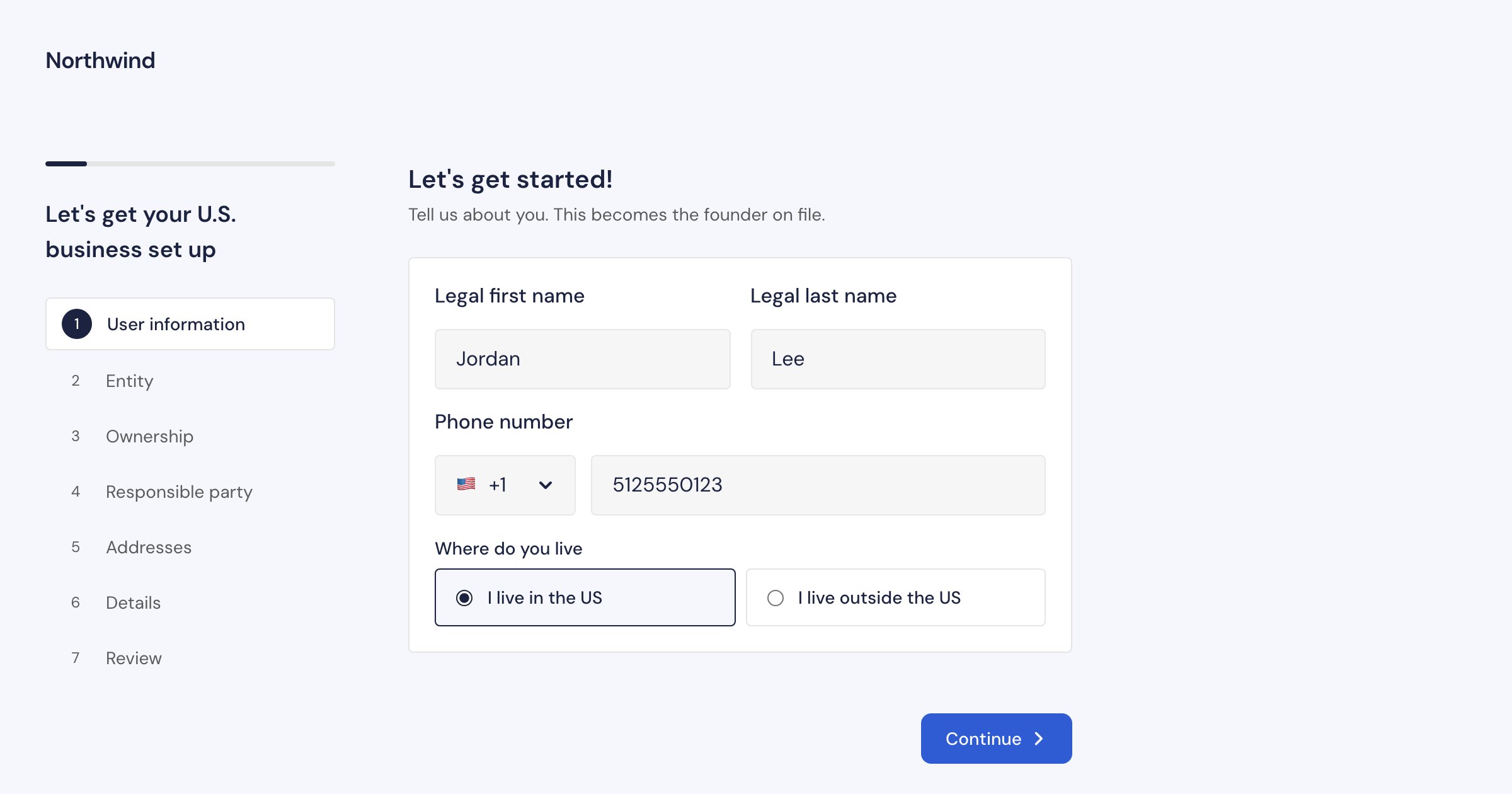
The doola Embedded SDK puts doola's complete company formation flow inside your product. Your customer fills in a guided wizard, pays you in your own checkout, signs what the IRS needs and follows their company to completion, without leaving your app and in your branding. doola files the company with the state, gets the EIN and provides the registered agent.
 ## How it works
One route on your server exchanges your secret key for a short-lived session for the user who is signed in to your product.
A few lines of JavaScript mount the wizard. The founder fills it in inside an iframe served by doola, so their personal and tax details never touch your systems.
On submit you get the new company's id. You charge your own price in your own checkout, and your server confirms the payment to doola. Filing starts then, and not before.
## Who does what
| | doola | You |
| - | - | - |
| Formation wizard: screens, fields, validation, state rules | ✓ | |
| Founder's personal and tax details, collected and stored | ✓ | |
| Signing the IRS forms (SS-4, Form 8821), inside the SDK | ✓ | |
| State filing, EIN, registered agent and company documents | ✓ | |
| The founder's company dashboard: status, documents, actions | ✓ | |
| Sign-in: deciding who the customer is | | ✓ |
| Price, checkout and payment | | ✓ |
| Refunds to the founder | | ✓ |
| Branding: your logo, colors and font | Applies it | Sets it in the Partner Portal |
How doola bills you for formations through the SDK is set by your partner agreement.
## Embedded SDK or Partner API?
Both form the same companies, with the same webhooks and the same company object. Pick by how much of the experience you want to build.
| | Embedded SDK | [Partner API](/api/introduction) |
| - | - | - |
| Screens | doola's, in your branding | You build every screen |
| Founder's tax ids and signatures | Collected by doola, never pass through your servers | Pass through your backend |
| IRS signing | Built in | You show doola's signing link |
| When doola starts filing | When you confirm payment | When you create the company |
| Founder's dashboard | Included | You build it from the API and webhooks |
| What you build | A session route, a mount, your checkout and one confirmation call | Customers, companies, required actions, documents and signing |
You can use both together. SDK companies are readable from the Partner API, and their events arrive at the same webhook endpoint.
## What is supported
* **LLC and C-Corp,** in every US state and Washington DC. The founder picks both in the wizard.
* **Founders anywhere in the world.** Without a US SSN, the founder signs the IRS Form SS-4 inside the SDK.
* **Desktop and mobile.** On phones the SDK opens full screen, so the keyboard never covers a field.
* **English.**
* **Chrome and Edge 111+, Firefox 128+, Safari 16.4+** (iOS 16.4+). No third-party cookies needed.
## Start building
Embed the SDK and take a test payment in about 15 minutes.
Keys, sessions and the formation lifecycle.
You own checkout. Here is exactly how it fits.
Every screen your customer sees, from the first step to the dashboard.
This documentation is built and hosted on [Mintlify](https://mintlify.com), a developer documentation platform.
## How it works
One route on your server exchanges your secret key for a short-lived session for the user who is signed in to your product.
A few lines of JavaScript mount the wizard. The founder fills it in inside an iframe served by doola, so their personal and tax details never touch your systems.
On submit you get the new company's id. You charge your own price in your own checkout, and your server confirms the payment to doola. Filing starts then, and not before.
## Who does what
| | doola | You |
| - | - | - |
| Formation wizard: screens, fields, validation, state rules | ✓ | |
| Founder's personal and tax details, collected and stored | ✓ | |
| Signing the IRS forms (SS-4, Form 8821), inside the SDK | ✓ | |
| State filing, EIN, registered agent and company documents | ✓ | |
| The founder's company dashboard: status, documents, actions | ✓ | |
| Sign-in: deciding who the customer is | | ✓ |
| Price, checkout and payment | | ✓ |
| Refunds to the founder | | ✓ |
| Branding: your logo, colors and font | Applies it | Sets it in the Partner Portal |
How doola bills you for formations through the SDK is set by your partner agreement.
## Embedded SDK or Partner API?
Both form the same companies, with the same webhooks and the same company object. Pick by how much of the experience you want to build.
| | Embedded SDK | [Partner API](/api/introduction) |
| - | - | - |
| Screens | doola's, in your branding | You build every screen |
| Founder's tax ids and signatures | Collected by doola, never pass through your servers | Pass through your backend |
| IRS signing | Built in | You show doola's signing link |
| When doola starts filing | When you confirm payment | When you create the company |
| Founder's dashboard | Included | You build it from the API and webhooks |
| What you build | A session route, a mount, your checkout and one confirmation call | Customers, companies, required actions, documents and signing |
You can use both together. SDK companies are readable from the Partner API, and their events arrive at the same webhook endpoint.
## What is supported
* **LLC and C-Corp,** in every US state and Washington DC. The founder picks both in the wizard.
* **Founders anywhere in the world.** Without a US SSN, the founder signs the IRS Form SS-4 inside the SDK.
* **Desktop and mobile.** On phones the SDK opens full screen, so the keyboard never covers a field.
* **English.**
* **Chrome and Edge 111+, Firefox 128+, Safari 16.4+** (iOS 16.4+). No third-party cookies needed.
## Start building
Embed the SDK and take a test payment in about 15 minutes.
Keys, sessions and the formation lifecycle.
You own checkout. Here is exactly how it fits.
Every screen your customer sees, from the first step to the dashboard.
This documentation is built and hosted on [Mintlify](https://mintlify.com), a developer documentation platform.